
 Sign in to Mod The Sims
- Site Map >
- Modding and Creation >
- Sims 3 Creation >
- Create a World >
- CAW Resources >
- Other Resources - Mountain Brushes for Photoshop
- Site Map >
- Modding and Creation >
- Sims 3 Creation >
- Create a World >
- CAW Resources >
- Other Resources - Mountain Brushes for Photoshop
Replies: 9 (Who?), Viewed: 41698 times.

#1
 24th Jan 2011 at 9:45 AM
Last edited by deathoflight : 26th Jan 2011 at 4:45 AM.
24th Jan 2011 at 9:45 AM
Last edited by deathoflight : 26th Jan 2011 at 4:45 AM.
24th Jan 2011 at 9:45 AM
Last edited by deathoflight : 26th Jan 2011 at 4:45 AM.
Posts: 44
Thanks: 338 in 6 Posts
 Mountain Brushes for Photoshop
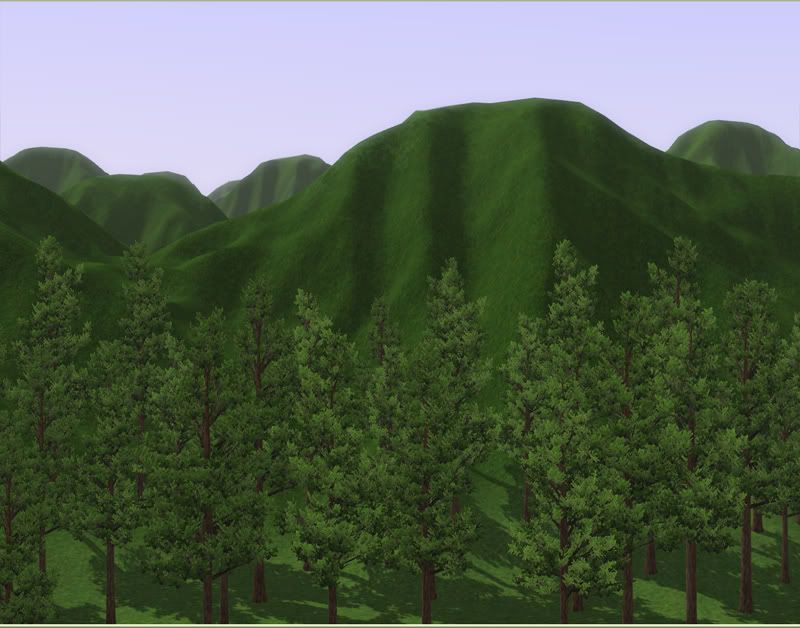
These brushes should be compatible with Photoshop 7 and all later versions. If you have Photoshop CS2 or newer, download mountains1.zip, for Photoshop 7 you need mountains1_PS7.zip. I haven't had much luck making heightmaps in Photoshop 7, since you have to convert to 8 bit mode to edit, and back to 16 bit to save. Those conversions leave everything slightly grainy. I don't know a way around this.
If you use a program other than Photoshop, you can download the Mountains1_PNG.zip, which has the PNG files I used to make the brushes. I know that Gimp has a way to define custom brushes from grayscale images. Other programs probably do too. I just don't know what those ways are.
To load the brushes select the brush tool and right click on an open document. The brush picker will pop up. In the top right of the pop up, there's an arrow. Click that. Halfway down, choose Load Brushes. Find the file you downloaded and open.
To use the brushes, select one of them, set the brush size to whatever you want. A brush size of ten would make a mountain ten squares across in game. So way too small to be useful. I've been staying around 200-300. Choose a shade of gray, create a new layer, and click with the brush tool. One click, one mountain.
Put your mountains on a layer above the rest of your map, so you can change the color if they came out too short, or too spiky. Only change the opacity of the layer and brushes if the land below is completely smooth, or the original terrain will show through. Adjust the brightness level instead.
Right now there are only ten brushes. I'm putting together packs with more, they should be up soon. I'll also be making some with mountains that have more creases, and mountains that have less.
If there's anything specific you want me to try and make, ask before the end of February. Dragon Age 2 comes out in March and I'll be outta here. Same with questions; not even my mother will get tech help until I crawl back out of my gaming cave.
Attached files:
 |
mountains1.zip (1.76 MB, 721 downloads) - View custom content | |
4945034 01-24-11 01:11 mountains1.abr -------- ------- 4945034 1 file |
||
| Description: The brushes for Photoshop CS2 and higher. | ||
| |
Mountains1_PNG.zip (1.01 MB, 374 downloads) - View custom content | |
0 01-25-11 22:29 Mountains1_PNG/ 115467 01-25-11 22:26 Mountains1_PNG/1.png 102532 01-25-11 22:29 Mountains1_PNG/10.png 119494 01-25-11 22:26 Mountains1_PNG/2.png 117447 01-25-11 22:26 Mountains1_PNG/3.png 104289 01-25-11 22:27 Mountains1_PNG/4.png 102430 01-25-11 22:27 Mountains1_PNG/5.png 101377 01-25-11 22:28 Mountains1_PNG/6.png 102919 01-25-11 22:28 Mountains1_PNG/7.png 102235 01-25-11 22:28 Mountains1_PNG/8.png 103990 01-25-11 22:29 Mountains1_PNG/9.png -------- ------- 1072180 11 files |
||
| Description: The PNG files used to create the brushes. | ||
| |
mountains1_PS7.zip (1.76 MB, 269 downloads) - View custom content | |
4942946 01-25-11 23:37 mountains1_PS7.abr -------- ------- 4942946 1 file |
||
| Description: The Brushes for Photoshop 7 | ||
Advertisement



#2
24th Jan 2011 at 5:29 PM
24th Jan 2011 at 5:29 PM
Hehe, why didn't I think of this? Good work, I'm going to try these out! Thank you deathoflight!
I will choose a path that's clear- I will choose free will
-RUSH- -RADIO- -RADIO- -EON- -ARCHIVES-
Simpeople and Me Archive- 11Dots Archive- My Sims World Archive- Sims 1 Archive
Angel Classic Rock Mix!
-RUSH- -RADIO- -RADIO- -EON- -ARCHIVES-
Simpeople and Me Archive- 11Dots Archive- My Sims World Archive- Sims 1 Archive
Angel Classic Rock Mix!

#3
24th Jan 2011 at 8:56 PM
24th Jan 2011 at 8:56 PM
Posts: 17
Does this work with Photoshop Elements?
#4
24th Jan 2011 at 11:06 PM
24th Jan 2011 at 11:06 PM
Posts: 44
Thanks: 338 in 6 Posts
Quote: Originally posted by simsample
| Hehe, why didn't I think of this? |
I know, right? This is so basic, I have no idea why I didn't do it the second CAW was released.
Quote: Originally posted by Screenhog
| Does this work with Photoshop Elements? |
I doubt it. You can try, but yeah, I don't think it'll work. I think my mother has Photoshop Elements, so I might be able to rig up something that's compatible with it in a few weeks, when I go over to clean out her spyware.

#5
24th Jan 2011 at 11:44 PM
24th Jan 2011 at 11:44 PM
Posts: 73
Thanks: 251 in 8 Posts
I would be very interested in having these brushes ready to go. I don't own photo shop, so a ready made one would be very useful.
Don't piss me off. I'm running out of places to hide the bodies.
Don't piss me off. I'm running out of places to hide the bodies.
#6
25th Jan 2011 at 12:10 AM
25th Jan 2011 at 12:10 AM
Posts: 44
Thanks: 338 in 6 Posts
Quote: Originally posted by corwin
| I would be very interested in having these brushes ready to go. I don't own photo shop, so a ready made one would be very useful. |
These are for use in Photoshop, when you're working on a heightmap, not in CAW, when you're actually building it. It *might* be possible to make custom brushes for CAW itself, but I wouldn't even know where to start. Also, that would limit you to mountains smaller than 100 square across, which is really small. Not much taller than the tallest palm tree.
I haven't used a graphics program other than Photoshop in more than a decade, so I have no idea how to go about doing this in another program. What program do you use? Can you define custom brush presets from an image file?
I could upload the PNG files I used to make the brushes, so people could try to make them work with other programs. The files would probably be too large to upload here, however, so I'd have to use an offsite link, and I don't know if that's allowed.
#7
25th Jan 2011 at 7:23 AM
25th Jan 2011 at 7:23 AM
Posts: 703
Thanks: 942 in 1 Posts
Are these supposed to show up in the brush preset picker?
I've got photoshop 7 and didn't see anything different after
extracting to the presets/brushes folder.
I've got photoshop 7 and didn't see anything different after
extracting to the presets/brushes folder.
#8
25th Jan 2011 at 8:02 AM
25th Jan 2011 at 8:02 AM
Posts: 44
Thanks: 338 in 6 Posts
Quote: Originally posted by lenglel
|
Are these supposed to show up in the brush preset picker? I've got photoshop 7 and didn't see anything different after extracting to the presets/brushes folder. |
These brushes were made with Photoshop CS2, so they won't work in 7, which is an earlier version. You're in luck though, since I've still got a copy of 7 from before I upgraded. I can have some brushes up for it tomorrow.
I've not had much luck with doing heightmaps in 7, I can export them in the right format using the SuperPNG plugin, but they come out...grainy. Let me know if you find a way around that. If not, you can just smooth, smooth, smooth once you get it in CAW, but more work.
And for anyone with Photoshop Elements, I downloaded a trial version, and if brushes work the same way, I'll make some for it as well.
Anyone who wants a step by step guide to using these to actually build something, I did a long, detailed tutorial on how to build the height map for this:
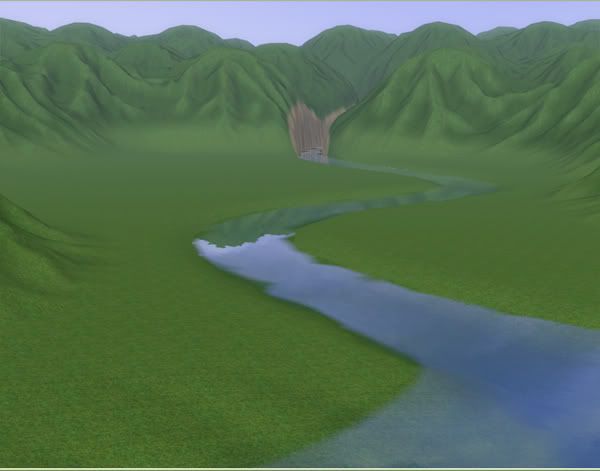
That'll be up tomorrow too. Everything tomorrow. Tonight I need sleep.
Test Subject
#9
9th Feb 2011 at 5:09 AM
9th Feb 2011 at 5:09 AM
Posts: 5
Thank you! I've been trying my hand at CAW. This is useful.
"Dragon Age 2 comes out in March and I'll be outta here."
Yeah, Simming hiatus when DA2 arrives. Gonna be epic!
"Dragon Age 2 comes out in March and I'll be outta here."
Yeah, Simming hiatus when DA2 arrives. Gonna be epic!

#10
29th Apr 2011 at 6:42 PM
29th Apr 2011 at 6:42 PM
Posts: 51
Two months to late it would seem 
Just found this today; time flies indeed! Did not know CAw has been out that long already; thank you anyhews! These are great!

Just found this today; time flies indeed! Did not know CAw has been out that long already; thank you anyhews! These are great!
Who Posted
|
|