
 Sign in to Mod The Sims
- Site Map >
- Modding and Creation >
- Sims 3 Creation >
- Tutorials >
- Modding - General - Tutorial: Creating S3 Custom Poses with Milkshape or Blender
- Site Map >
- Modding and Creation >
- Sims 3 Creation >
- Tutorials >
- Modding - General - Tutorial: Creating S3 Custom Poses with Milkshape or Blender


#26
 5th Apr 2011 at 10:44 AM
5th Apr 2011 at 10:44 AM
Posts: 591
Thanks: 2585 in 9 Posts
Quote: Originally posted by mattvoiers
| I'm not sure if this will help you or not, but i was getting that same error message and so what i did was Copied the FullBuild0 to my desktop (COPIED IT) and was able to open it from there. . . it has something to do with the permissions for that folder i have discovered, once i find a way to work around that i'll post again :-) |
In Windows Vista and Windows 7:
When installing application(s) to the program files folder...they become owned by TrustedInstaller (most of the time).
It has been reported that all operations writing to files there should be done so as an Administrator.
However, I run a domain network in my home and was logged in as a domain administrator and had admin rights and I still had issues accessing files for both the Sims 3/Sims 2 as well as The Elder Scrolls IV Oblivion.
I solved all of these issues by installing my games (or anything that other tools/utilities that would be writing to frequently) to another folder (that was not in 'Program Files').
I'm am not sure if running as an adminstrator would solve the problem or not. I think the TrustedInstaller is to blame (i.e. the files there are under a relaxed-kind of file protection, like system files)
Edit:
* If you are using Windows Vista or Windows 7: you might be able to use the system tool: mklink.exe
to create a junction or symbolic link in one folder and point it the game files...all tools could use this 'fake' link and should work fine.
* you could also use HardShell Link which is basically the same thing, but you can right-click with mouse in explorer to do it.
this would work for XP,Vista, and Win7
Advertisement



#27
5th Apr 2011 at 11:08 AM
5th Apr 2011 at 11:08 AM
Posts: 11,682
Thanks: 9680 in 11 Posts
As I have pointed out, you simply need to tick the Readonly box when S3PE lets you browse to fullbuild to open it. All this effort of copying fullbuilds is not needed. S3PE protects against accidental saves to game files in this way.
"You can do refraction by raymarching through the depth buffer" (c. Reddeyfish 2017)
"You can do refraction by raymarching through the depth buffer" (c. Reddeyfish 2017)
Test Subject
#28
5th Apr 2011 at 3:13 PM
5th Apr 2011 at 3:13 PM
Posts: 8
I followed those instructions... But when I play, I did buy the pose player, but there's no interactions available... Why is that? :'(


#29
5th Apr 2011 at 5:31 PM
5th Apr 2011 at 5:31 PM
Quote: Originally posted by angiew826
| I followed those instructions... But when I play, I did buy the pose player, but there's no interactions available... Why is that? :'( |
Do you have your packages installed in the correct place?
C://User/Documents/ElectronicArts/TheSims3/Mods/Packages ?
Formally SeeMyu | Retired Mod

#30
5th Apr 2011 at 9:47 PM
5th Apr 2011 at 9:47 PM
Posts: 78
Quote: Originally posted by mattvoiers
| I'm not sure if this will help you or not, but i was getting that same error message and so what i did was Copied the FullBuild0 to my desktop (COPIED IT) and was able to open it from there. . . it has something to do with the permissions for that folder i have discovered, once i find a way to work around that i'll post again :-) |
oh my gosh it actually worked!!! thanks soo much, but now im really stuck, I've never used milkshape before, I only got it for this and I have no idea how to create the pose, I thought it would be easy just to move the arms and legs or stuff, but it's not, I can't figure out how to move a thing
 does anybody know of a tutorial to even move body parts or how to do basic stuff with milkshape, but mostly how to do move the body parts
  thanks for this now it works, but now I cant make it, lol probably cause I've never even made a mesh, thanks for all the help guys!
Last night I lay in bed looking up at the stars in the sky and I thought to myself, where the heck is the ceiling.
Test Subject
#31
5th Apr 2011 at 11:40 PM
5th Apr 2011 at 11:40 PM
Posts: 8
Quote: Originally posted by Simul8rReviews
|
Do you have your packages installed in the correct place? C://User/Documents/ElectronicArts/TheSims3/Mods/Packages ? |
i got the mods file and package file.... maybe the problem was that blender or milkshape thing.... could you teach me???

#32
5th Apr 2011 at 11:45 PM
5th Apr 2011 at 11:45 PM
Posts: 2,932
Thanks: 15574 in 28 Posts
Quote: Originally posted by angiew826
| I followed those instructions... But when I play, I did buy the pose player, but there's no interactions available... Why is that? :'( |
http://www.modthesims.info/download.php?t=408296
Lilly, I plan to write a tutorial on how to make poses with MS unless someone beats me to it. It prolly won't be ready until the weekend though since RL is keeping me busy.
Test Subject
#33
5th Apr 2011 at 11:54 PM
5th Apr 2011 at 11:54 PM
Posts: 8
could you submit a video instaling this pose player and about the blender? (I've downloaded the blender)
#34
6th Apr 2011 at 12:22 AM
6th Apr 2011 at 12:22 AM
Posts: 2,932
Thanks: 15574 in 28 Posts
Installing the Pose Player is as easy as putting it in your Mods folder.
The problem you're having is not related to the Pose Player. It is related to how you have your game set up. I've given you a link above which should help with that problem. You can get more help from that link than I'm going to be able to provide you here.
The problem you're having is not related to the Pose Player. It is related to how you have your game set up. I've given you a link above which should help with that problem. You can get more help from that link than I'm going to be able to provide you here.
Test Subject
#35
6th Apr 2011 at 12:26 AM
6th Apr 2011 at 12:26 AM
Posts: 8
ok..... how to use that....? I've downloaded it....
#36
6th Apr 2011 at 12:33 AM
6th Apr 2011 at 12:33 AM
Posts: 2,932
Thanks: 15574 in 28 Posts
Quote: Originally posted by angiew826
| ok..... how to use that....? I've downloaded it.... |
To learn more about the download from the thread I linked you should ask in that thread. Granthes can help you more with that than I can



#37
6th Apr 2011 at 12:35 AM
6th Apr 2011 at 12:35 AM
Posts: 1,740
Thanks: 107797 in 53 Posts
This thread is for questions regarding the tutorial. Please look in the that tool's thread for instructions how to use it.
"Part of being a mesher is being persistent through your own confusedness" - HystericalParoxysm
| (• ◡•)| (❍ᴥ❍ʋ) [◕ ‿ ◕]
| (• ◡•)| (❍ᴥ❍ʋ) [◕ ‿ ◕]
Test Subject
#38
6th Apr 2011 at 2:54 AM
6th Apr 2011 at 2:54 AM
Posts: 8
don't understand.... -.-" A 13 years old girl tryin to understand this... maybe it's impossible....
#39
6th Apr 2011 at 3:08 AM
6th Apr 2011 at 3:08 AM
Posts: 2,932
Thanks: 15574 in 28 Posts
Not impossible Angie.  Go to the thread where you downloaded the launcher...the thread that I linked above. Ask questions about the launcher in the thread where you downloaded it since the person who posted that is the one who knows the most about it.
Once you have your game all set if you're still having issues with Pose Player or tutorial then post questions about that here.
Go to the thread where you downloaded the launcher...the thread that I linked above. Ask questions about the launcher in the thread where you downloaded it since the person who posted that is the one who knows the most about it. Once you have your game all set if you're still having issues with Pose Player or tutorial then post questions about that here.
Test Subject
#40
6th Apr 2011 at 3:10 AM
6th Apr 2011 at 3:10 AM
Posts: 8
okay... lemme try...  thanks anyway...
 thanks anyway...
Test Subject
#41
6th Apr 2011 at 5:02 AM
6th Apr 2011 at 5:02 AM
Posts: 10
Why I had editor am_body_nim in Milkshape by rotate the skeleton when I clicked Anim button at the right bottom of MS like TS2, then I used Select and Rotate button to edior the pose. After that I exported to SMD overwrite the old. Then converted this SMD to CLIP to open with the S3PE without change and saved it, and exported to package file in Mods folder.
But when I opened the game ~> choose a household ~> Buy the Pose Player ~> Click Pose by name with the name I choose "a_pose_tut" but nothing happened, when the sim acted whatever action, and pause, just stand right there no more action when clicked OK....
Why it cant be do the pose I had created @-)
But when I opened the game ~> choose a household ~> Buy the Pose Player ~> Click Pose by name with the name I choose "a_pose_tut" but nothing happened, when the sim acted whatever action, and pause, just stand right there no more action when clicked OK....
Why it cant be do the pose I had created @-)

#42
6th Apr 2011 at 5:11 AM
6th Apr 2011 at 5:11 AM
Posts: 116
Thanks: 1168 in 17 Posts
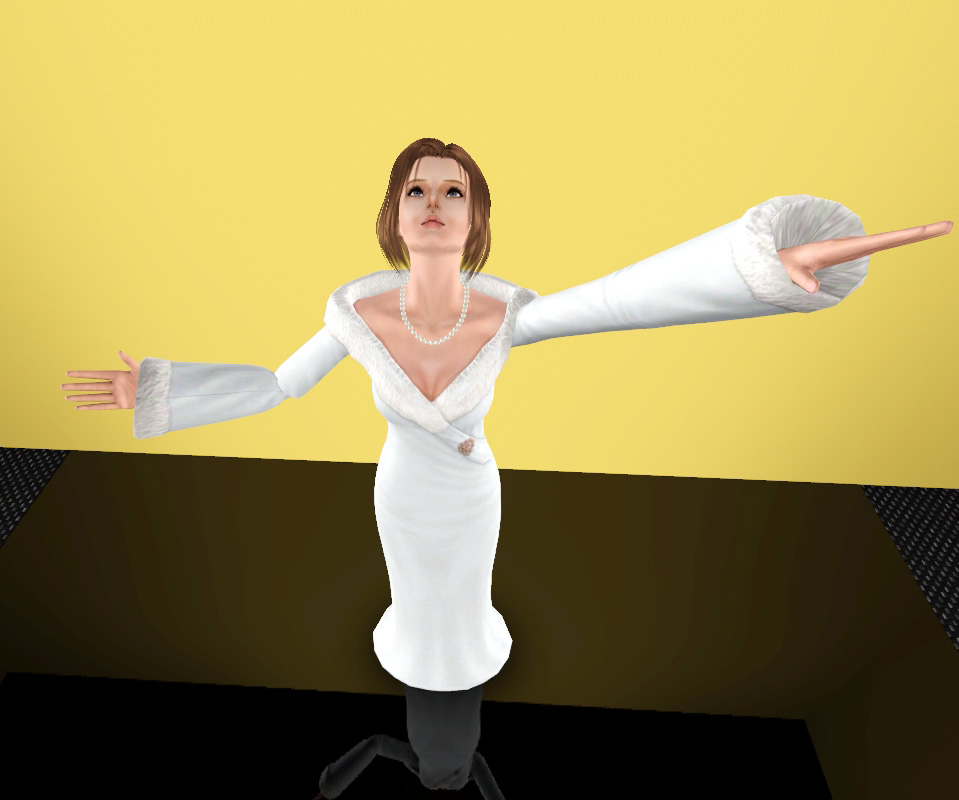
I did just a quick pose to test, it works great! 

Test Subject
#43
6th Apr 2011 at 5:53 AM
6th Apr 2011 at 5:53 AM
Posts: 10
@MarkJS: Oh my Gods, Awesome, but can You teach me that how can you export to game with S3PE step @-), when I finished the name then click OK, no action  just stand there T.T no more action
  (
(
 just stand there T.T no more action (
#44
6th Apr 2011 at 7:15 AM
6th Apr 2011 at 7:15 AM
Posts: 2,932
Thanks: 15574 in 28 Posts
Quote: Originally posted by Memory_Moon
|
Why I had editor am_body_nim in Milkshape by rotate the skeleton when I clicked Anim button at the right bottom of MS like TS2, then I used Select and Rotate button to edior the pose. After that I exported to SMD overwrite the old. Then converted this SMD to CLIP to open with the S3PE without change and saved it, and exported to package file in Mods folder. But when I opened the game ~> choose a household ~> Buy the Pose Player ~> Click Pose by name with the name I choose "a_pose_tut" but nothing happened, when the sim acted whatever action, and pause, just stand right there no more action when clicked OK.... Why it cant be do the pose I had created @-) |
Also, sometimes with custom poses you will need to select the Pose Player a second time, so there is a second instance of it in your Sim's queue. Select the pose you have created again and only then delete the first instance in your queue.
Test Subject
#45
6th Apr 2011 at 8:07 AM
6th Apr 2011 at 8:07 AM
Posts: 8
i've a problem 
i'm done creating my pose and export to SMD file, but when i convert the SMD to CLIP in AnimTool, a message pop up from the right said "Unable to open file: a_pose_x.animation
Error 2".....
how can i solve this?
i'm done creating my pose and export to SMD file, but when i convert the SMD to CLIP in AnimTool, a message pop up from the right said "Unable to open file: a_pose_x.animation
Error 2".....
how can i solve this?
Test Subject
#46
6th Apr 2011 at 11:31 AM
6th Apr 2011 at 11:31 AM
Posts: 2
i got the exact same problem as Memory_Moon, my sim just stand there and won't do any action after i type in my pose.
i think i might did something wrong for exporting package in S3PE..
here is my steps:
open S3PE, go to file click on new, then click resource, importing the BAK00 file, a resource details window pop up then just click ok, last save it as package.
am i doing it correct? if not please tell me where i did wrong
thanks!
i think i might did something wrong for exporting package in S3PE..
here is my steps:
open S3PE, go to file click on new, then click resource, importing the BAK00 file, a resource details window pop up then just click ok, last save it as package.
am i doing it correct? if not please tell me where i did wrong
thanks!
Test Subject
#47
6th Apr 2011 at 11:42 AM
6th Apr 2011 at 11:42 AM
Posts: 10
Quote: Originally posted by orangemittens
|
MM did you use the CLIP that is indicated in the tutorial? I'm not sure what you mean by am_body_nim in Milkshape. Also, sometimes with custom poses you will need to select the Pose Player a second time, so there is a second instance of it in your Sim's queue. Select the pose you have created again and only then delete the first instance in your queue. |
Thanks to replying me,
I mean that I use the mesh ms3d in your download link of Mesher "am_body_4_anim" and "adult_rigfile" and I use a_xevt701 CLIP like what you said in the tutorial.
I click the button Anim in MS to rotate the skeleton to make poses, then I export overwrite to SMD file which was converted in previous step with AnimTool
then I convert it to CLIP and open with S3PE to package, but nothing happen although I did it 5 or 6 times @@, Sim just like me_bete said!
Tk you first
#48
6th Apr 2011 at 1:57 PM
6th Apr 2011 at 1:57 PM
Posts: 2,932
Thanks: 15574 in 28 Posts
Memory Moon: Sorry, I didn't recoginize the name of the rig the way you had typed it. Did you try playing the pose twice in game? I've had the same issue you're having occasionally...that is, I click on the box, type in the pose name, and the Sim just stands there without playing my pose.
What I do in this case is leave the first instance of my request in the upper left corner of the game, click on the Pose Box again, and choose to play the current pose so that a second instance of my request pops up in the upper left corner of the game. Then I delete the first instance. At that point the Sim will go into the pose. When I've had this happen I've only had to play twice the first time I try the pose.
me bete: when you import the resource you should select the .animation resource, not the .bak00 file.
bonnietung: could you give a few more details about the process you used to make your pose? Was the the total message you saw in the right side of the Anim Tool dialogue box? Also, you may want to consider a more unique name for your poses...including your creator name might be a good idea at the very least.
What I do in this case is leave the first instance of my request in the upper left corner of the game, click on the Pose Box again, and choose to play the current pose so that a second instance of my request pops up in the upper left corner of the game. Then I delete the first instance. At that point the Sim will go into the pose. When I've had this happen I've only had to play twice the first time I try the pose.
me bete: when you import the resource you should select the .animation resource, not the .bak00 file.
bonnietung: could you give a few more details about the process you used to make your pose? Was the the total message you saw in the right side of the Anim Tool dialogue box? Also, you may want to consider a more unique name for your poses...including your creator name might be a good idea at the very least.
Test Subject
#49
6th Apr 2011 at 2:38 PM
6th Apr 2011 at 2:38 PM
Posts: 10
Thks again for your useful support, really thank you, I have created another pose to test again @@
Now I'm entering my game to test again.
Actually, I had click again the pose like you said for 3 times , and it's work, very thank you but I still have a problem so can I ask you a little question if you dont mind itWhen the pose worked, the Sim act like the mesh default with 2 hands, like the "am_body_4_anim" model, not my pose had created.
So I have a question about Milkshape step, I import the "am_body_4_anim" in MS, then I import SMD file
After that I click the Anim buttom to rotate the skeleton, when I have done anything for pose, I choose Export/SMD to overwrite the SMD before.
And it appear a screen ask me for sure because the animation will be mess up if I export this animation mode!
Click OK ~> After that it appear another screen ask me 2 option, Reference - Sequence with the "With Vertex Weight (HL2)"
I'm so confuse with this step @@ I have no idea about that
Now My pose work but it didn't do my pose instead of the default Body
Now I'm entering my game to test again.
Actually, I had click again the pose like you said for 3 times , and it's work, very thank you but I still have a problem so can I ask you a little question if you dont mind it
When the pose worked, the Sim act like the mesh default with 2 hands, like the "am_body_4_anim" model, not my pose had created.So I have a question about Milkshape step, I import the "am_body_4_anim" in MS, then I import SMD file
After that I click the Anim buttom to rotate the skeleton, when I have done anything for pose, I choose Export/SMD to overwrite the SMD before.
And it appear a screen ask me for sure because the animation will be mess up if I export this animation mode!
Click OK ~> After that it appear another screen ask me 2 option, Reference - Sequence with the "With Vertex Weight (HL2)"
I'm so confuse with this step @@ I have no idea about that
Now My pose work but it didn't do my pose instead of the default Body
Test Subject
#50
6th Apr 2011 at 2:40 PM
6th Apr 2011 at 2:40 PM
Posts: 8
thanks for replying my issue, i've solve it by myself~ lol
cuz i didn't overwrite my old SMD file so i've got the error message. I name it "pose" cuz this is just a pose test and i'm not gonna upload it, but i hope i'll do so~~
anyway, thanks for your tutorial!
cuz i didn't overwrite my old SMD file so i've got the error message. I name it "pose" cuz this is just a pose test and i'm not gonna upload it, but i hope i'll do so~~
anyway, thanks for your tutorial!
Who Posted
|
|