
 Sign in to Mod The Sims
- Site Map >
- Modding and Creation >
- Sims 3 Creation >
- Tutorials >
- Create A World - Tutorial: Adding Water Planes (For Custom Lakes or Rivers)
- Site Map >
- Modding and Creation >
- Sims 3 Creation >
- Tutorials >
- Create A World - Tutorial: Adding Water Planes (For Custom Lakes or Rivers)

#76
 21st Jan 2012 at 6:21 AM
21st Jan 2012 at 6:21 AM
Posts: 85
Thanks: 22 in 1 Posts
Duds: the planes not clipping may be do to the fact that you need to cover a lot of space before it clips. When using them for rivers you need to use rocks and stuff to hide edges. Can you give me a list of all the coordinate sets you used? I'm still looking in to the divide by zero error but I couldn't get it to pop up for me before my video card died.
Freayn: The instance on the 707CA200 file you uploaded is 1 the first water plane needs to be number 0 as computers often start there(think of it as being zero away from the first one ). Rename the file from "S3_707CA200_00000000_0000000000000001%%+UNKN+Y=150.3,X1=5,Z1=6,X2=400,Z2=401" to "S3_707CA200_00000000_0000000000000000%%+UNKN+Y=150.3,X1=5,Z1=6,X2=400,Z2=401" and it should work. If not please post again. My video card is fired so I can't even start Sims 3 right now or I would test it for you. Good luck.
Freayn: The instance on the 707CA200 file you uploaded is 1 the first water plane needs to be number 0 as computers often start there(think of it as being zero away from the first one
 ). Rename the file from "S3_707CA200_00000000_0000000000000001%%+UNKN+Y=150.3,X1=5,Z1=6,X2=400,Z2=401" to "S3_707CA200_00000000_0000000000000000%%+UNKN+Y=150.3,X1=5,Z1=6,X2=400,Z2=401" and it should work. If not please post again. My video card is fired so I can't even start Sims 3 right now or I would test it for you. Good luck.
Advertisement

#77
23rd Jan 2012 at 10:00 AM
23rd Jan 2012 at 10:00 AM
Posts: 61
Thanks: 1760 in 8 Posts
Hi Chris,
I have attached the co-ords I used for my water levels, Hope you get your video card sorted soon.
I have attached the co-ords I used for my water levels, Hope you get your video card sorted soon.
Attached files:
 |
water levels.rar (322 Bytes, 34 downloads) - View custom content | |
                  Size   Packed Ratio  Date   Time     Attr      CRC   Meth Ver
-------------------------------------------------------------------------------
 water levels.txt
                   533      242  45% 23-01-12 22:56  .....A.   1B6AE4FF m3b 2.9
-------------------------------------------------------------------------------
    1              533      242  45%
|
||
#78
27th Jan 2012 at 12:52 AM
27th Jan 2012 at 12:52 AM
Posts: 85
Thanks: 22 in 1 Posts
The divide by zero error has been fixed. The files the tool was making where all broken, as i forgot to update one of 3 php files for the tool on the server. Sorry for any problems it make have caused and my delay in fixing it. I'm working on a java version still, but I've got collage classes, job hunting, relationships, family pleasing and enjoying video games for myself that all come first.
Freayn: You will need to remake your water plane.
Freayn: You will need to remake your water plane.



#79
27th Jan 2012 at 1:11 AM
27th Jan 2012 at 1:11 AM
Thanks for updating, zaide_chris- we all appreciate it!
I will choose a path that's clear- I will choose free will
-RUSH- -RADIO- -RADIO- -EON- -ARCHIVES-
Simpeople and Me Archive- 11Dots Archive- My Sims World Archive- Sims 1 Archive
Angel Classic Rock Mix!
-RUSH- -RADIO- -RADIO- -EON- -ARCHIVES-
Simpeople and Me Archive- 11Dots Archive- My Sims World Archive- Sims 1 Archive
Angel Classic Rock Mix!
Test Subject
#80
27th Jan 2012 at 1:53 AM
27th Jan 2012 at 1:53 AM
Posts: 2
Thanks soooo much, zaide_chris, that did the trick! (Sorry for the late response, by the way; I've been really busy too now that classes have started back up.)
Test Subject
#81
2nd Feb 2012 at 8:36 PM
2nd Feb 2012 at 8:36 PM
Posts: 18
Hi,
first: thx for this great tut! I get the basic idea now, but I've still a problem.
6. Edit byte 0x12 of the 0x90624C1B file with your hex editor to the number of water planes you want to use.
I have no idea what to do at this point. And i don't know with what kind of keywords i could use to search for help in Google....
Is there a tut for dummies?^^
I'm using Notepad++ with the Hex-Editor Plug-in.
Hope you can help me,
Jero
first: thx for this great tut! I get the basic idea now, but I've still a problem.
6. Edit byte 0x12 of the 0x90624C1B file with your hex editor to the number of water planes you want to use.
I have no idea what to do at this point. And i don't know with what kind of keywords i could use to search for help in Google....
Is there a tut for dummies?^^
I'm using Notepad++ with the Hex-Editor Plug-in.
Hope you can help me,
Jero

#82
3rd Feb 2012 at 9:29 PM
3rd Feb 2012 at 9:29 PM
Jero, you need to edit that byte in the 0x90624C1B resource to represent the number of planes you have. So if you have one plane, it will be 01, for two planes 02 and so on. Remember that this is Hexadecimal (base 16) though, so if you have 10 planes it will be 0A, 11 will be 0B and so on.
In this image (where I have imported the resources to a new file in S3Pe) you can see the relevant byte highlighted- in this case I have two water planes (two 0x707CA200 resources) so it is set to 02:

To change that I would just open up the 0x90624C1B resource in my hex editor and change that byte, then save.
In this image (where I have imported the resources to a new file in S3Pe) you can see the relevant byte highlighted- in this case I have two water planes (two 0x707CA200 resources) so it is set to 02:
To change that I would just open up the 0x90624C1B resource in my hex editor and change that byte, then save.
I will choose a path that's clear- I will choose free will
-RUSH- -RADIO- -RADIO- -EON- -ARCHIVES-
Simpeople and Me Archive- 11Dots Archive- My Sims World Archive- Sims 1 Archive
Angel Classic Rock Mix!
-RUSH- -RADIO- -RADIO- -EON- -ARCHIVES-
Simpeople and Me Archive- 11Dots Archive- My Sims World Archive- Sims 1 Archive
Angel Classic Rock Mix!
Test Subject
#83
4th Feb 2012 at 9:46 AM
4th Feb 2012 at 9:46 AM
Posts: 18
Thx for the answer, simsample!
I think now i understand this step, but I'm still doing something wrong, 'cause it doesn't work for me... there are no water planes in my world.
( sorry for my bad English in the next texts, if it won't work for me^^ I am German. )
I have two water planes now, too.
So I only have to change the byte to 02, haven't I?
I uploaded a .rar-file with the 3 files and a picture. The 0x90624C1B resource is already formed. Could you look for mistakes I've done perhaps?
after taking the photo I importet the three files into my world in S3PE and save the world. But opening the CAW I always have to see a world without water planes....
Hope you can help me a second time,
Jero
I think now i understand this step, but I'm still doing something wrong, 'cause it doesn't work for me... there are no water planes in my world.
( sorry for my bad English in the next texts, if it won't work for me^^ I am German. )
I have two water planes now, too.
So I only have to change the byte to 02, haven't I?
I uploaded a .rar-file with the 3 files and a picture. The 0x90624C1B resource is already formed. Could you look for mistakes I've done perhaps?
after taking the photo I importet the three files into my world in S3PE and save the world. But opening the CAW I always have to see a world without water planes....
Hope you can help me a second time,
Jero
Attached files:
| |
Jero Water Plane.rar (251.9 KB, 23 downloads) - View custom content | |
                  Size   Packed Ratio  Date   Time     Attr      CRC   Meth Ver
-------------------------------------------------------------------------------
 S3_90624C1B_00000000_0000000000000001%%+UNKN.bnry
                    39       39 100% 04-02-12 10:18  .....A.   27A7A9B1 m0d 2.9
 Water planes Jero.jpg
                288063   256688  89% 04-02-12 10:35  .....A.   31FAD241 m3d 2.9
 S3_707CA200_00000000_0000000000000000%%+UNKN+Y=35,X1=63,Z1=56,X2=67,Z2=128.bnry
                  1799      390  21% 04-02-12 10:08  .....A.   B1EBC1C9 m3d 2.9
 S3_707CA200_00000000_0000000000000001%%+UNKN+Y=20,X1=76,Z1=137,X2=79,Z2=189(1).bnry
                  1799      393  21% 04-02-12 10:13  .....A.   C692BBD4 m3d 2.9
-------------------------------------------------------------------------------
    4           291700   257510  88%
|
||
| Description: Contains Picture and 3Files for 2WaterPlanes | ||
#84
4th Feb 2012 at 10:29 PM
4th Feb 2012 at 10:29 PM
I'm not getting any water planes either, Jero. What co-ordinates did you put into the water plane tool?
I will choose a path that's clear- I will choose free will
-RUSH- -RADIO- -RADIO- -EON- -ARCHIVES-
Simpeople and Me Archive- 11Dots Archive- My Sims World Archive- Sims 1 Archive
Angel Classic Rock Mix!
-RUSH- -RADIO- -RADIO- -EON- -ARCHIVES-
Simpeople and Me Archive- 11Dots Archive- My Sims World Archive- Sims 1 Archive
Angel Classic Rock Mix!
#85
5th Feb 2012 at 9:59 AM
Last edited by zaide_chris : 5th Feb 2012 at 10:26 AM.
5th Feb 2012 at 9:59 AM
Last edited by zaide_chris : 5th Feb 2012 at 10:26 AM.
Posts: 85
Thanks: 22 in 1 Posts
Jero: You didn't make a mistake. You just found a bug with my tool. Your water planes are too small for my tool, checking "Force one tile" under advanced should fix them.
The error is caused by trying to brake planes up in to "tiles" that are 32 by 32 or bigger but when the planes are less then 32 wide in ether direction my tool chokes.
simsample: Files made with my tool have the cords tagged on to the end of the file name.
the cords he used are
Y=35,X1=63,Z1=56,X2=67,Z2=128
and
Y=20,X1=76,Z1=137,X2=79,Z2=189
one has a X2-X1 of 4, the other 3, way smaller then 32
edit:
I fixed the tool to throw a error on planes smaller then 32 wide ether direction and added the same direction to my first post.
The error is caused by trying to brake planes up in to "tiles" that are 32 by 32 or bigger but when the planes are less then 32 wide in ether direction my tool chokes.
simsample: Files made with my tool have the cords tagged on to the end of the file name.
the cords he used are
Y=35,X1=63,Z1=56,X2=67,Z2=128
and
Y=20,X1=76,Z1=137,X2=79,Z2=189
one has a X2-X1 of 4, the other 3, way smaller then 32

edit:
I fixed the tool to throw a error on planes smaller then 32 wide ether direction and added the same direction to my first post.
#86
5th Feb 2012 at 12:22 PM
5th Feb 2012 at 12:22 PM
Wow, that was quick, zaide_chris!
Ah, yes, I forgot about the co-ordinates being in the file name, I just imported them to a world without really looking!
Thanks for getting that fixed, and so fast too!
Ah, yes, I forgot about the co-ordinates being in the file name, I just imported them to a world without really looking!

Thanks for getting that fixed, and so fast too!
I will choose a path that's clear- I will choose free will
-RUSH- -RADIO- -RADIO- -EON- -ARCHIVES-
Simpeople and Me Archive- 11Dots Archive- My Sims World Archive- Sims 1 Archive
Angel Classic Rock Mix!
-RUSH- -RADIO- -RADIO- -EON- -ARCHIVES-
Simpeople and Me Archive- 11Dots Archive- My Sims World Archive- Sims 1 Archive
Angel Classic Rock Mix!
Test Subject
#87
5th Feb 2012 at 7:30 PM
5th Feb 2012 at 7:30 PM
Posts: 18
Sorry for the late answer.
Thx for your help! Now it works! I can see my own water planes in my world!!!^^
unfortunately there has only been two lines floating anywhere over the ground of my test-world.
I'm going to try it tomorrow again with improved coordinates.
Hope I won't have any problems again :-)
Jero
Thx for your help! Now it works! I can see my own water planes in my world!!!^^
unfortunately there has only been two lines floating anywhere over the ground of my test-world.
I'm going to try it tomorrow again with improved coordinates.
Hope I won't have any problems again :-)
Jero

#88
6th Feb 2012 at 1:40 AM
6th Feb 2012 at 1:40 AM
@zaide_chris and anyone else interested in the water planes- you may be interested in the 'pond tool' that atavera found in the CAW executable. See here to unlock it:
http://www.modthesims.info/showthread.php?t=468279
http://www.modthesims.info/showthread.php?t=468279
I will choose a path that's clear- I will choose free will
-RUSH- -RADIO- -RADIO- -EON- -ARCHIVES-
Simpeople and Me Archive- 11Dots Archive- My Sims World Archive- Sims 1 Archive
Angel Classic Rock Mix!
-RUSH- -RADIO- -RADIO- -EON- -ARCHIVES-
Simpeople and Me Archive- 11Dots Archive- My Sims World Archive- Sims 1 Archive
Angel Classic Rock Mix!
#89
6th Feb 2012 at 1:46 AM
6th Feb 2012 at 1:46 AM
Posts: 85
Thanks: 22 in 1 Posts
I knew EA would have had a much easier to use method or tool, but for them to have included it in CAW but then disabled it for the users, that's just messed up.
#90
6th Feb 2012 at 1:56 AM
6th Feb 2012 at 1:56 AM
I guess they thought the 'end user' wouldn't be 'intelligent' enough to figure out how to use it!
It's not as accurate as your water plane tool- as it's point and click, so difficult to control the precise elevation. So I don't think this in any way makes your tool obsolete. Besides, a new patch for CAW will have to be compiled each time EA updates.
It's not as accurate as your water plane tool- as it's point and click, so difficult to control the precise elevation. So I don't think this in any way makes your tool obsolete. Besides, a new patch for CAW will have to be compiled each time EA updates.
I will choose a path that's clear- I will choose free will
-RUSH- -RADIO- -RADIO- -EON- -ARCHIVES-
Simpeople and Me Archive- 11Dots Archive- My Sims World Archive- Sims 1 Archive
Angel Classic Rock Mix!
-RUSH- -RADIO- -RADIO- -EON- -ARCHIVES-
Simpeople and Me Archive- 11Dots Archive- My Sims World Archive- Sims 1 Archive
Angel Classic Rock Mix!

#91
7th Feb 2012 at 1:27 PM
7th Feb 2012 at 1:27 PM
Posts: 3,180
Thanks: 10385 in 45 Posts
Please help me
I imported the water planes from Bridgeport and decorated the waterfall.
But the lake (above) does not look exactly like the lake (downstairs).
What can I do?
I imported the water planes from Bridgeport and decorated the waterfall.
But the lake (above) does not look exactly like the lake (downstairs).
What can I do?
#92
8th Feb 2012 at 5:43 AM
8th Feb 2012 at 5:43 AM
Posts: 85
Thanks: 22 in 1 Posts
Are they both the same depth?
Do they both have the same opacity?
Try opening the world and make a small height change by both lakes then save. CLOSE CAW and reopen your world. That may fix it other then that I need your .world file or all the 0x90624C1B and 0x707CA200 parts extracted in a zip.
Also(from first post):
Do they both have the same opacity?
Try opening the world and make a small height change by both lakes then save. CLOSE CAW and reopen your world. That may fix it other then that I need your .world file or all the 0x90624C1B and 0x707CA200 parts extracted in a zip.
Also(from first post):
Quote:
|
I extracted a water plane from one world and want to use it in another but it's not working. CAW edits water planes whenever you save after making at-least one terrain change, so it's always saver to just make a new plane rather then reusing one from another world. |
#93
8th Feb 2012 at 10:42 AM
8th Feb 2012 at 10:42 AM
Posts: 3,180
Thanks: 10385 in 45 Posts
Thanks,
I smoothed the terrain and now it looks better than the old version.
I smoothed the terrain and now it looks better than the old version.
#94
8th Feb 2012 at 11:20 AM
8th Feb 2012 at 11:20 AM
The water planes do have a slightly different quality to them to the sea though- as can be seen quite clearly in Twinbrook. The water is not so reflective, and the ripples seem a little more pronounced.
I will choose a path that's clear- I will choose free will
-RUSH- -RADIO- -RADIO- -EON- -ARCHIVES-
Simpeople and Me Archive- 11Dots Archive- My Sims World Archive- Sims 1 Archive
Angel Classic Rock Mix!
-RUSH- -RADIO- -RADIO- -EON- -ARCHIVES-
Simpeople and Me Archive- 11Dots Archive- My Sims World Archive- Sims 1 Archive
Angel Classic Rock Mix!
Test Subject
#95
13th Feb 2012 at 9:34 AM
13th Feb 2012 at 9:34 AM
Posts: 12
Is there another reason that would cause a water plane to "disappear" besides the center point being below ground?
I've been following this tutorial and having a field day working on a project I never thought I'd be able to do, and I managed to get two water planes working perfectly.
The third water plane I've tried to add, however, shows up when I open CAW after using the S3PE tool to import my changes; when I attempt to save, the water plane disappears. The only way to get it back again at that point is to re-import the plane and reopen CAW. (It appears to fully delete it?)
Here's what I know about the plane:
+ The center point is not below ground.
+ I used the online tool to download the binary, and am using a very small plane so I checked Force Single Tile.
Things I think may be suspect:
+ This plane has an opacity of 1500, which is different from my other two planes.
+ One of the edges of this plane may be layering under the edge of an earlier water plane. (They are lined up together creating a multi-level waterfall, but because this part is angled, I can't get it to line up right without a lot of issues.)
Are there any ideas?
I've been following this tutorial and having a field day working on a project I never thought I'd be able to do, and I managed to get two water planes working perfectly.
The third water plane I've tried to add, however, shows up when I open CAW after using the S3PE tool to import my changes; when I attempt to save, the water plane disappears. The only way to get it back again at that point is to re-import the plane and reopen CAW. (It appears to fully delete it?)
Here's what I know about the plane:
+ The center point is not below ground.
+ I used the online tool to download the binary, and am using a very small plane so I checked Force Single Tile.
Things I think may be suspect:
+ This plane has an opacity of 1500, which is different from my other two planes.
+ One of the edges of this plane may be layering under the edge of an earlier water plane. (They are lined up together creating a multi-level waterfall, but because this part is angled, I can't get it to line up right without a lot of issues.)
Are there any ideas?
#96
13th Feb 2012 at 2:00 PM
13th Feb 2012 at 2:00 PM
Quote: Originally posted by Parhelion
| + One of the edges of this plane may be layering under the edge of an earlier water plane. |
That may be significant; if you change the co-ordinates of the water plane so that it is not beneath the other plane, does it work?
I will choose a path that's clear- I will choose free will
-RUSH- -RADIO- -RADIO- -EON- -ARCHIVES-
Simpeople and Me Archive- 11Dots Archive- My Sims World Archive- Sims 1 Archive
Angel Classic Rock Mix!
-RUSH- -RADIO- -RADIO- -EON- -ARCHIVES-
Simpeople and Me Archive- 11Dots Archive- My Sims World Archive- Sims 1 Archive
Angel Classic Rock Mix!
Test Subject
#97
13th Feb 2012 at 10:05 PM
13th Feb 2012 at 10:05 PM
Posts: 12
Quote: Originally posted by simsample
| That may be significant; if you change the co-ordinates of the water plane so that it is not beneath the other plane, does it work? |
After several little experiments, I think I've found the culprit.
My original plane was 20 x 25 units large; even though I had 'Force Single Tile' selected in the binary download tool, the game refuses to save any planes that are this small. It would not save a plane until after I pushed the size of the plane a few pegs over the < 32 limit.
It's not a huge issue because the game appears to fix ugly corners that stick out into the air, but thought I'd post my findings if this comes up on anyone else's game.

#98
30th Apr 2012 at 11:02 AM
30th Apr 2012 at 11:02 AM
Posts: 368
Thanks: 1108 in 7 Posts
Thank you so much! I didn't have any problems. Here's a pic of what I've done with my water plane:
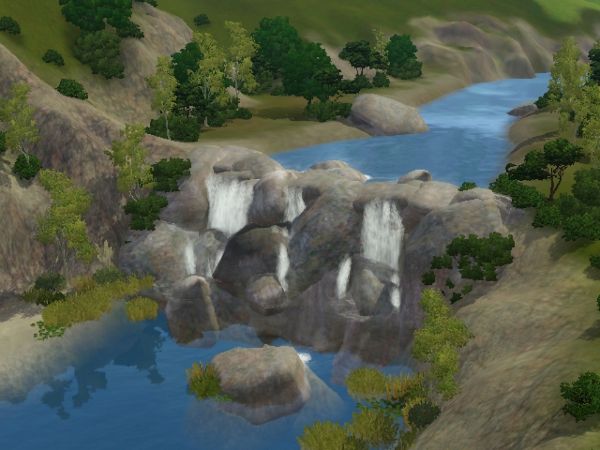
I didn't have any problems. Here's a pic of what I've done with my water plane:
Test Subject
#100
15th May 2012 at 6:40 PM
15th May 2012 at 6:40 PM
Posts: 14
Sorry for reviving this thread, but since it's a tutorial, I guess it's not as bad (I hope?).
I started a new world after seeing this, and didn't do anything except make the basic shape of my world (no details, no smoothing just a rough draft), because I didn't wanna waste too much time on something I wasn't sure would work.
I read every singly comment, numerous times actually and got everything done following the steps, but my water planes aren't showing... I sorta made them higher than the land... say if the land was 15, I typed in 16 on the Plane Generator. I did thick the "Force One Tile Box" and I edited the file that was supposed to be edited, and imported everything back into the world (including a bnry.bak file that was created after I edited the 906... file, hopefully that's ok o.O).
I really have no idea what i'm doing wrong as i'm very slow with this stuff. I spent 5 minutes staring at the program wondering what 0x12 was, until I went back and re-read the thread again and found mu answer xD.
I started a new world after seeing this, and didn't do anything except make the basic shape of my world (no details, no smoothing just a rough draft), because I didn't wanna waste too much time on something I wasn't sure would work.
I read every singly comment, numerous times actually and got everything done following the steps, but my water planes aren't showing... I sorta made them higher than the land... say if the land was 15, I typed in 16 on the Plane Generator. I did thick the "Force One Tile Box" and I edited the file that was supposed to be edited, and imported everything back into the world (including a bnry.bak file that was created after I edited the 906... file, hopefully that's ok o.O).
I really have no idea what i'm doing wrong as i'm very slow with this stuff. I spent 5 minutes staring at the program wondering what 0x12 was, until I went back and re-read the thread again and found mu answer xD.
Attached files:
| |
Downloads.rar (1.7 KB, 21 downloads) - View custom content | |
                  Size   Packed Ratio  Date   Time     Attr      CRC   Meth Ver
-------------------------------------------------------------------------------
 S3_707CA200_00000000_0000000000000000%%+UNKN+Y=53,X1=112,Z1=1798,X2=221,Z2=1838.bnry
                   225      126  56% 15-05-12 17:04  .....A.   662014EA m3b 2.9
 S3_90624C1B_00000000_0000000000000001%%+UNKN.bnry
                    39       39 100% 15-05-12 18:21  .....A.   18E86E8E m0b 2.9
 S3_90624C1B_00000000_0000000000000001%%+UNKN.bnry.bak
                    39       39 100% 15-05-12 18:13  .....A.   EED56B48 m0b 2.9
 S3_707CA200_00000000_0000000000000000%%+UNKN+Y=16,X1=899,Z1=998,X2=1245,Z2=1037.bnry
                   225      127  56% 15-05-12 17:40  .....A.   ACD37E38 m3b 2.9
 S3_707CA200_00000000_0000000000000000%%+UNKN+Y=16,X1=232,Z1=157,X2=601,Z2=206.bnry
                   225      126  56% 15-05-12 17:35  .....A.   FBCB0F97 m3b 2.9
 S3_707CA200_00000000_0000000000000000%%+UNKN+Y=63,X1=642,Z1=202,X2=696,Z2=215.bnry
                   225      124  55% 15-05-12 17:31  .....A.   5B14B57C m3b 2.9
 S3_707CA200_00000000_0000000000000000%%+UNKN+Y=17,X1=403,Z1=1824,X2=607,Z2=1856.bnry
                   225      123  54% 15-05-12 17:13  .....A.   3F27D4CB m3b 2.9
 S3_707CA200_00000000_0000000000000000%%+UNKN+Y=27,X1=229,Z1=1812,X2=385,Z2=1865.bnry
                   225      129  57% 15-05-12 17:11  .....A.   D22B1BA0 m3b 2.9
-------------------------------------------------------------------------------
    8             1428      833  58%
|
||
Who Posted
|
|