
 Sign in to Mod The Sims
- Site Map >
- Modding and Creation >
- Sims 2 Creation >
- Tutorials >
- Objects - Changing the object Placement
- Site Map >
- Modding and Creation >
- Sims 2 Creation >
- Tutorials >
- Objects - Changing the object Placement


#1
 9th Aug 2005 at 10:25 AM
Last edited by leefish : 17th Jan 2014 at 7:43 PM.
9th Aug 2005 at 10:25 AM
Last edited by leefish : 17th Jan 2014 at 7:43 PM.
9th Aug 2005 at 10:25 AM
Last edited by leefish : 17th Jan 2014 at 7:43 PM.
Changing the object Placement
CHANGING THE OBJECTS PLACEMENT
DISCLAIMERThis is NOT a tutorial; it is intended to help average-experienced object creators performing specific tasks, or to give users a deeper in-sight on specific modding-related subjects. So, don't expect to find step-by-step explanations, to be performed "blindly". Please DO NOT REPOST the following info, or part of them, on other sites.
-------------------------------------------------------------------------------------
SUMMARY
In this article, we'll discuss about changing the objects placement, i.e. the ability of the object to be placed on tables, counters, walls, ground, etc...
This InfoCenter article is also provided in PDF format. To view it, we strongly suggest to download the Foxisoft PFD Viewer: it's free and small, less than 1Mb!
 This
This -------------------------------------------------------------------------------------
PART 1 - FINDING WHERE THE PLACEMENT INFO ARE STORED
You may have noticed that in the OBJD there are many fields that hold information about the object placement. For instance, field 0x0006 is "Default allowed Heigh flags", field 0x0005 is "Default Wall placement flags".
Defining the object placement using those OBJD fields would have been easy... Too easy! So, Maxis decided to define the object placement using the "Init" BHAVs, just to make things harder

FAQ: The "Init" BHAV is a set of instructions that are executed every time an object is picked from the catalogue and placed on the lot. These instructions may define multiple aspects of the object behaviour, among which its placement.
 FAQ: The "Init" BHAV is a set of instructions that are executed every time an object is picked from the catalogue and placed on the lot. These instructions may define multiple aspects of the object behaviour, among which its placement.
Almost every object contains a private Init BHAV (called "Function - Init") that usually calls one or more semiglobal Init BHAV. Either in the private or in the semiglobal BHAVs, the placement flags for the object are set.

HINT: If you can't find an Init BHAV in the package, or there are multiple ones, you can know for sure which one is the right BHAV to edit by opening the Object Functions file: in the first line, you'll find the name of the "real" Init BHAV. (If there are multiple Object Functions files, look into the one with the lowest Instance number).

 HINT: If you can't find an Init BHAV in the package, or there are multiple ones, you can know for sure which one is the right BHAV to edit by opening the Object Functions file: in the first line, you'll find the name of the "real" Init BHAV. (If there are multiple Object Functions files, look into the one with the lowest Instance number).
PART 2 - EDITING THE PLACEMENT FLAGS
Now, you could search the BHAVs and spot the all the lines that adjust the object placement, but the easiest thing to do is to add some lines at the end of the private BHAV, and use them to change the placement flags at will: all the previous settings will be overridden.
As said, we have to add a line at the end of the private Init BHAV, set the function (Op-Code) to 0x0002 (="Expression") and set the operands in the form:
My 0x00NN Set Flag Literal Value 0x00MM
In the Expression above, 0x00NN is the type of placement (horizontal or wall placement), and 0x00MM is the flag that we want to "set" (= activate). You can set the following values:
My 0x0004 Set Flag Literal Value 0x0001 ---> Placeable on floor
My 0x0004 Set Flag Literal Value 0x0002 ---> Placeable on low tables
My 0x0004 Set Flag Literal Value 0x0003 ---> Placeable on dining tables
My 0x0004 Set Flag Literal Value 0x0004 ---> Placeable on counters
My 0x0004 Set Flag Literal Value 0x0005 ---> Placeable on Sims
My 0x0004 Set Flag Literal Value 0x0006 ---> Placeable in sims' hand
My 0x0004 Set Flag Literal Value 0x0007 ---> "Sitting" :confused:
My 0x0004 Set Flag Literal Value 0x0008 ---> Placeable on end tables
My 0x0004 Set Flag Literal Value 0x0009 ---> Placeable in counters
My 0x0004 Set Flag Literal Value 0x000A ---> Placeable under counters
My 0x0004 Set Flag Literal Value 0x000B ---> Placeable on decorative slots (i.e. mantles)
My 0x0004 Set Flag Literal Value 0x000C ---> Placeable on Driveways (not sure 100%, it could be "on OFB counters")
My 0x0004 Set Flag Literal Value 0x000D ---> Placeable on OFB Shelves (not sure 100%)
My 0x000D Set Flag Literal Value 0x0001 ---> Needs wall on its front
My 0x000D Set Flag Literal Value 0x0002 ---> Needs wall on the right
My 0x000D Set Flag Literal Value 0x0003 ---> Needs wall on its back
My 0x000D Set Flag Literal Value 0x0004 ---> Needs wall on the left
My 0x000D Set Flag Literal Value 0x0005 ---> Needs front-right facing
My 0x000D Set Flag Literal Value 0x0006 ---> Allowed front-right facing
My 0x000D Set Flag Literal Value 0x0007 ---> Needs front-left facing
My 0x000D Set Flag Literal Value 0x0008 ---> Allowed front-left facing
My 0x000D Set Flag Literal Value 0x0009 ---> No front wall allowed
My 0x000D Set Flag Literal Value 0x000A ---> No right wall allowed
My 0x000D Set Flag Literal Value 0x000B ---> No back wall allowed
My 0x000D Set Flag Literal Value 0x000C ---> No left wall allowed
My 0x000D Set Flag Literal Value 0x000D ---> Needs fence
My 0x000D Set Flag Literal Value 0x000E ---> No fence arch allowed
If you want your object to be placeable on different surfaces, you have to add (and edit) multiple lines to the private Init BHAV.
sometimes you may need to prevent an object to be placed on specific surfaces; in this case, use as reference the table above, but use the "Clear Flag" operand instead of the "Set Flag".
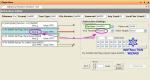
Be sure also that the OpCode is set to "0x0002" (see green mark in picture).
Lastly, instead of manually edit the Hex values, you can use the extremely useful "Instruction Wizard" (blue marks)
EXAMPLE
If you want your object to be placed on all the surfaces (tables, counters, mantles), you have to add 5 lines:
My 0x0004 Set Flag Literal Value 0x0002
My 0x0004 Set Flag Literal Value 0x0003
My 0x0004 Set Flag Literal Value 0x0004
My 0x0004 Set Flag Literal Value 0x0008
My 0x0004 Set Flag Literal Value 0x000B
(optional: My 0x0004 Set Flag Literal Value 0x0001 to allow placement on floor)
"My 0x0008 Set Flag 0x000B"---> Hide for cut-away
"My 0x0008 Clear Flag 0x000B" ---> Always visible, even with walls down
Since we can't change the surfaces Support Strenght, we have to edit the object Weight: add another line to the BHAV, set the OpCode to 0x0002 as usual, and use the expression:
"My 0x001B Assign To Literal Value 0x0000" ---> Set the object weight (My 0x001B) to zero
-------------------------------------------------------------------------------------
OTHER USEFUL RESOURCES
Modding InfoCenter Index - Comprehensive list of all the InfoCenter threads
Object Creation Workshop and Repair Center - If your object doesn't work, no matter what you try
Colour Options for "EP-ready" packages - About the texture linking tecniques
Sims 2 start to finish Object Creation Tutorial - Learn how to create your own object
-------------------------------------------------------------------------------------
Attached files:
 |
Modding InfoCenter - PDF - Changing the object placement.rar (205.2 KB, 990 downloads) - View custom content | |
                  Size   Packed Ratio  Date   Time     Attr      CRC   Meth Ver
-------------------------------------------------------------------------------
 Modding InfoCenter - PDF - Changing the object placement.pdf
                283617   210030  74% 09-08-05 17:13  .....A.   6FA572F2 m3d 2.9
-------------------------------------------------------------------------------
    1           283617   210030  74%
|
||
I've finally started my Journal. Information only, no questions.
My latest activity: CEP 9.2.0! - AnyGameStarter 2.1.1 (UPD) - Scriptorium v.2.2f - Photo & Plaques hide with walls - Magazine Rack (UPD) - Animated Windows Hack (UPD) - Custom Instrument Hack (UPD) - Drivable Cars Without Nightlife (UPD) - Courtesy Lights (FIX) - Custom Fence-Arches - Painting-TV - Smarter Lights (UPD)
I *DON'T* accept requests, sorry.
Advertisement

#2
9th Aug 2005 at 2:16 PM
9th Aug 2005 at 2:16 PM
Posts: 450
Thanks: 508 in 4 Posts
Thank you, Numenor! :bow:
Another useful information from you
Another useful information from you
Yes, I am serious though I'm not serious at all. I'm serious about this!
Even the joker can be deadly serious...
Even the joker can be deadly serious...
Wichtig ist, was hinten raus kommt!
Entscheidend daran ist, wie?
Entscheidend daran ist, wie?
#3
10th Aug 2005 at 1:43 AM
Last edited by windkeeper : 10th Aug 2005 at 7:21 AM.
10th Aug 2005 at 1:43 AM
Last edited by windkeeper : 10th Aug 2005 at 7:21 AM.
Posts: 279
Thanks: 21099 in 62 Posts
Great to have all that info put together and explained! Thanks! I had the list of placement and intersection codes for a while. My problem is, just adding extra lines of code in BHAV doesn't always work. I was successful with stopping painting from going down with the wall and setting few decorative objects to allow other object or person intersection, thats about it. For example, right now I'm trying to change "on a pedestal" statue to allow person and object intersection by adding modified 0x0008 code - no luck.
Oh, and here is the codes for 0x0008, got them at this forum:
1: can be stepped over
2: allow object intersection
3: allow object and person intersection
4: can walk
5: allow person intersection
6: in use
7: notified by idle for input
8: Do NOT Use Maya Model Footprint
9: chair facing
A: burning
B: hide for cutaway
C: unused -was fireproof
D: Remove Floor
E: Add Floor if Required
F: Hide Floor
*Edit* got my object working by importing BHAV from another object. Needs more testing but so far it works.
Oh, and here is the codes for 0x0008, got them at this forum:
1: can be stepped over
2: allow object intersection
3: allow object and person intersection
4: can walk
5: allow person intersection
6: in use
7: notified by idle for input
8: Do NOT Use Maya Model Footprint
9: chair facing
A: burning
B: hide for cutaway
C: unused -was fireproof
D: Remove Floor
E: Add Floor if Required
F: Hide Floor
*Edit* got my object working by importing BHAV from another object. Needs more testing but so far it works.
#4
10th Aug 2005 at 8:41 AM
10th Aug 2005 at 8:41 AM
I've read somewhere (probably Dizzy2 said that) that after the Init BHAV has been executed, some parameters can't be modified any more. this means that when changing the BHAV and restarting the game, you have to sell and rebuy the object.
Thanks for letting me know, though... I hate when things don't work like they logically should!
Thanks for letting me know, though... I hate when things don't work like they logically should!
#5
10th Aug 2005 at 9:38 AM
10th Aug 2005 at 9:38 AM
Posts: 11,682
Thanks: 9680 in 11 Posts
If you set something in an init, that *should* only run once - when the object is instantiated. Ie you'd have to rebuy the object if you want to run its init again. An init will also normally run if an object errors, it resets and reruns init.
All the attributes and other settings that can be set in an init can be set at any time during gameplay, for example as a result of choosing a menu option.
There is a way to have an already-purchased object re-initialised after you have updated its code. That is to specify a BHAV to run in the "load" object function. Usually just give the number of the init BHAV! Load runs when the game detects the file on disk has changed.
However, if you specified things like placement flags in the init, that will not affect already-placed objects. Those are only used at the time of placing the object, they will not suddenly cause an object to leap up from a coffee table and hang itself from the wall.
All the attributes and other settings that can be set in an init can be set at any time during gameplay, for example as a result of choosing a menu option.
There is a way to have an already-purchased object re-initialised after you have updated its code. That is to specify a BHAV to run in the "load" object function. Usually just give the number of the init BHAV! Load runs when the game detects the file on disk has changed.
However, if you specified things like placement flags in the init, that will not affect already-placed objects. Those are only used at the time of placing the object, they will not suddenly cause an object to leap up from a coffee table and hang itself from the wall.
#6
10th Aug 2005 at 3:59 PM
10th Aug 2005 at 3:59 PM
That's what I thought. But why WindKeeper says that this procedure not always works? I'd like to know from her if re-buying the object fixes the placement.
I can't see any reason why a flag set in the last line of the init BHAV shouldn't override the previous settings.
I've finally started my Journal. Information only, no questions.
My latest activity: CEP 9.2.0! - AnyGameStarter 2.1.1 (UPD) - Scriptorium v.2.2f - Photo & Plaques hide with walls - Magazine Rack (UPD) - Animated Windows Hack (UPD) - Custom Instrument Hack (UPD) - Drivable Cars Without Nightlife (UPD) - Courtesy Lights (FIX) - Custom Fence-Arches - Painting-TV - Smarter Lights (UPD)
I can't see any reason why a flag set in the last line of the init BHAV shouldn't override the previous settings.
I've finally started my Journal. Information only, no questions.
My latest activity: CEP 9.2.0! - AnyGameStarter 2.1.1 (UPD) - Scriptorium v.2.2f - Photo & Plaques hide with walls - Magazine Rack (UPD) - Animated Windows Hack (UPD) - Custom Instrument Hack (UPD) - Drivable Cars Without Nightlife (UPD) - Courtesy Lights (FIX) - Custom Fence-Arches - Painting-TV - Smarter Lights (UPD)
I *DON'T* accept requests, sorry.
#7
10th Aug 2005 at 4:00 PM
10th Aug 2005 at 4:00 PM
Posts: 11,682
Thanks: 9680 in 11 Posts
Well I don't know what exactly is "not working" for them. An already-bought object will not reinitialise itself when you change the file. That is logical and to be expected, given the knowledge that Init only runs at purchase time and when the object errors.
If you buy an object whose init says "place on coffee tables" then you leave the game, change the init to say "don't place on coffee tables" then go back into the game, the object will still want to go on coffee tables, because nothing has happened to make it run Init again.
This is completely logical in my opinion. If they want already-purchased objects to pick up such changes, they need to set a "load" function in the object functions table, pointing to the Init function, so that the object will run Init when they return to the game after changing the file. This is the documented purpose of the Load function.
If you buy an object whose init says "place on coffee tables" then you leave the game, change the init to say "don't place on coffee tables" then go back into the game, the object will still want to go on coffee tables, because nothing has happened to make it run Init again.
This is completely logical in my opinion. If they want already-purchased objects to pick up such changes, they need to set a "load" function in the object functions table, pointing to the Init function, so that the object will run Init when they return to the game after changing the file. This is the documented purpose of the Load function.

#8
10th Aug 2005 at 4:25 PM
10th Aug 2005 at 4:25 PM
Posts: 363
Thanks: 6878 in 50 Posts
That's nice to know. I always assumed Load was strictly for when you loaded a lot. Now, if only we could run behaviors in simless build mode...
#9
10th Aug 2005 at 4:20 PM
10th Aug 2005 at 4:20 PM
Posts: 11,682
Thanks: 9680 in 11 Posts
Windkeeper, to allow intersection, you may also need to add an "allow intersection" function. At its simplest you can just put in a meaningless line that returns true.
#10
10th Aug 2005 at 4:21 PM
10th Aug 2005 at 4:21 PM
Posts: 11,682
Thanks: 9680 in 11 Posts
Dizzy, it is for when you load a lot. It won't run at other times. You close your game, edit your object, load the game, load the lot, and then the object's "load" function runs. But only if it's been changed on disk.
#11
10th Aug 2005 at 4:41 PM
10th Aug 2005 at 4:41 PM
Posts: 279
Thanks: 21099 in 62 Posts
Um, I didn't say "it stops working", I was trying to say that for some objects it just plain doesn't work. For example, that venus statue. I added the extra line of code to allow intersection, but sims still cannot walk through it. The reason is probably because the Init calls "sculptures" bhav and I guess that resets everything I try to change. But when I removed all the bhav functions and replaced them with the others taken from a simple decor object that do not have calls to external functions, I was able to add the code I needed and finally make it work.
#12
10th Aug 2005 at 4:44 PM
10th Aug 2005 at 4:44 PM
Posts: 11,682
Thanks: 9680 in 11 Posts
The global init can only reset something you changed if it runs after your settings. If one BHAV says Set Flag and the other says Clear Flag, it will be the instruction that happens last of all that will win.
I don't think you have understood what I meant about the Allow Intersection function. It's not a line of code in an init, it's a BHAV of its own that is referenced from the Object Functions table. You can put various conditions in there like it can intersect with particular objects but not others. Nowadays if I want to allow intersection I do use that function, even if I don't want to run conditions.
I don't think you have understood what I meant about the Allow Intersection function. It's not a line of code in an init, it's a BHAV of its own that is referenced from the Object Functions table. You can put various conditions in there like it can intersect with particular objects but not others. Nowadays if I want to allow intersection I do use that function, even if I don't want to run conditions.
#13
10th Aug 2005 at 5:09 PM
10th Aug 2005 at 5:09 PM
Posts: 279
Thanks: 21099 in 62 Posts
I did understand, I just wouldn't know how to create that function and how to call it . I would love to see an example, or a mini-tut, as that is the behavior that I need to change the most.
. I would love to see an example, or a mini-tut, as that is the behavior that I need to change the most.
#14
10th Aug 2005 at 5:07 PM
10th Aug 2005 at 5:07 PM
Posts: 11,682
Thanks: 9680 in 11 Posts
Well I don't think we should hi-jack this thread any more, but I'd be happy to start a new one about Object Functions.
#15
10th Aug 2005 at 5:21 PM
10th Aug 2005 at 5:21 PM
Posts: 279
Thanks: 21099 in 62 Posts
Yes, please!!! And sorry, Numenor for the off-top!
#16
10th Aug 2005 at 5:49 PM
10th Aug 2005 at 5:49 PM
Never mind, it's interesting (but please Inge don't post a tutorial here )
I'd like to take a look at the Venus Statue init BHAVs, though... Maybe the "Allow intersection" flag works differetly than the placement flags, or maybe it's just useless if the "Allow intersection" BHAV isn't called somwhere...
I've finally started my Journal. Information only, no questions.
My latest activity: CEP 9.2.0! - AnyGameStarter 2.1.1 (UPD) - Scriptorium v.2.2f - Photo & Plaques hide with walls - Magazine Rack (UPD) - Animated Windows Hack (UPD) - Custom Instrument Hack (UPD) - Drivable Cars Without Nightlife (UPD) - Courtesy Lights (FIX) - Custom Fence-Arches - Painting-TV - Smarter Lights (UPD)
)I'd like to take a look at the Venus Statue init BHAVs, though... Maybe the "Allow intersection" flag works differetly than the placement flags, or maybe it's just useless if the "Allow intersection" BHAV isn't called somwhere...
I've finally started my Journal. Information only, no questions.
My latest activity: CEP 9.2.0! - AnyGameStarter 2.1.1 (UPD) - Scriptorium v.2.2f - Photo & Plaques hide with walls - Magazine Rack (UPD) - Animated Windows Hack (UPD) - Custom Instrument Hack (UPD) - Drivable Cars Without Nightlife (UPD) - Courtesy Lights (FIX) - Custom Fence-Arches - Painting-TV - Smarter Lights (UPD)
I *DON'T* accept requests, sorry.
#17
10th Aug 2005 at 6:33 PM
10th Aug 2005 at 6:33 PM
Posts: 279
Thanks: 21099 in 62 Posts
The venus statue ("on a pedestal") has three bhav functions: init, init common, and main. Init function calls "[semiglobal] Function - Init - Sculptures". Init Common function has the placement codes, including My 0x0008 which is set to remove the flag. I tried changing that line to "set" the flag, tried adding a new My 0x0008 line at the bottom - both didn't work.
#18
10th Aug 2005 at 6:48 PM
Last edited by Inge Jones : 10th Aug 2005 at 6:51 PM.
10th Aug 2005 at 6:48 PM
Last edited by Inge Jones : 10th Aug 2005 at 6:51 PM.
Posts: 11,682
Thanks: 9680 in 11 Posts
Windkeeper, your line 1 that you added isn't being run. See the grey line with an arrow pointing to it? That means it's not linked into anything - none of the other lines Goto it. You'll know it's going to run when you see a green or a red line going to it.
Also you'd find it useful to use the Sort button, it helps you to see more clearly what order the lines will be executed in.
Also you'd find it useful to use the Sort button, it helps you to see more clearly what order the lines will be executed in.
#19
10th Aug 2005 at 7:29 PM
10th Aug 2005 at 7:29 PM
Posts: 279
Thanks: 21099 in 62 Posts
That was the original file without my changes. But I didn't realise that line was not linked when I tried to use it. I was also adding a new line at the bottom and connecting it to the last executable line. Here is what it looked like (see pic). Thanks for the "sorting", I wasn't sure it that affects the actual functions.
#20
10th Aug 2005 at 7:38 PM
10th Aug 2005 at 7:38 PM
Posts: 11,682
Thanks: 9680 in 11 Posts
What's in the individual inits? Might they be setting the flag wrong? Presumably they do their stuff after calling Init Common. Also have you followed through all the way from the OJBF table that all the parts of your object are running that Init Common?
I wrote the thing about OBJFs I promised you, do try using the Allow Intersection function I mentioned.
Hmm and just in case there is something wrong with flag 3 (ISTR I've had trouble with that one too) use 2 and 5 instead
I wrote the thing about OBJFs I promised you, do try using the Allow Intersection function I mentioned.
Hmm and just in case there is something wrong with flag 3 (ISTR I've had trouble with that one too) use 2 and 5 instead
#21
10th Aug 2005 at 8:18 PM
Last edited by windkeeper : 10th Aug 2005 at 9:21 PM.
10th Aug 2005 at 8:18 PM
Last edited by windkeeper : 10th Aug 2005 at 9:21 PM.
Posts: 279
Thanks: 21099 in 62 Posts
Thanks, Inge! I'm moving my questions there then :D
Numenor, just for your information. After reading Inge post I found whats wrong, the Init Common function is not even listed in OBJF, so there was very little point trying to change it as it looks like it is not even used! I changed Init function instead by adding My 0x0008” set to 3, and the object now can intersect with other objects and sims.
Numenor, just for your information. After reading Inge post I found whats wrong, the Init Common function is not even listed in OBJF, so there was very little point trying to change it as it looks like it is not even used!
 I changed Init function instead by adding My 0x0008” set to 3, and the object now can intersect with other objects and sims.
#22
10th Aug 2005 at 11:04 PM
10th Aug 2005 at 11:04 PM
You're right: the Init Common is probably a remaining of an old version, that Maxis discontinued... It's not used at all.
I think I'll add a "Hint" in the main post, explaining that the "Private Init BHAV" I refer to, is the one called in the OBJF.
So far, I only pointed out that the BHAV name is always "Function - Init" (and that's true also for the Venus statue).
I've finally started my Journal. Information only, no questions.
My latest activity: CEP 9.2.0! - AnyGameStarter 2.1.1 (UPD) - Scriptorium v.2.2f - Photo & Plaques hide with walls - Magazine Rack (UPD) - Animated Windows Hack (UPD) - Custom Instrument Hack (UPD) - Drivable Cars Without Nightlife (UPD) - Courtesy Lights (FIX) - Custom Fence-Arches - Painting-TV - Smarter Lights (UPD)
I think I'll add a "Hint" in the main post, explaining that the "Private Init BHAV" I refer to, is the one called in the OBJF.
So far, I only pointed out that the BHAV name is always "Function - Init" (and that's true also for the Venus statue).
I've finally started my Journal. Information only, no questions.
My latest activity: CEP 9.2.0! - AnyGameStarter 2.1.1 (UPD) - Scriptorium v.2.2f - Photo & Plaques hide with walls - Magazine Rack (UPD) - Animated Windows Hack (UPD) - Custom Instrument Hack (UPD) - Drivable Cars Without Nightlife (UPD) - Courtesy Lights (FIX) - Custom Fence-Arches - Painting-TV - Smarter Lights (UPD)
I *DON'T* accept requests, sorry.
#23
14th Aug 2005 at 12:00 PM
14th Aug 2005 at 12:00 PM
Notice: The question by Lethe_s about indoor use of barbecues has been moved here:
http://www.modthesims2.com/showthread.php?t=83770
I've finally started my Journal. Information only, no questions.
My latest activity: CEP 9.2.0! - AnyGameStarter 2.1.1 (UPD) - Scriptorium v.2.2f - Photo & Plaques hide with walls - Magazine Rack (UPD) - Animated Windows Hack (UPD) - Custom Instrument Hack (UPD) - Drivable Cars Without Nightlife (UPD) - Courtesy Lights (FIX) - Custom Fence-Arches - Painting-TV - Smarter Lights (UPD)
http://www.modthesims2.com/showthread.php?t=83770
I've finally started my Journal. Information only, no questions.
My latest activity: CEP 9.2.0! - AnyGameStarter 2.1.1 (UPD) - Scriptorium v.2.2f - Photo & Plaques hide with walls - Magazine Rack (UPD) - Animated Windows Hack (UPD) - Custom Instrument Hack (UPD) - Drivable Cars Without Nightlife (UPD) - Courtesy Lights (FIX) - Custom Fence-Arches - Painting-TV - Smarter Lights (UPD)
I *DON'T* accept requests, sorry.
#24
30th Sep 2005 at 10:46 AM
30th Sep 2005 at 10:46 AM
Posts: 363
Thanks: 6878 in 50 Posts
Looks like there's a new "allowed height" flag (used specifically for ownable cars):
My allowed height flags (0x4) Set Flag Const 0x101:0xC(12)
I suppose this means placeable on driveways.
See:
# Group = 0x7F4EA230, Instance = 0x2071
# Title = Functional - Init - Ownable
My allowed height flags (0x4) Set Flag Const 0x101:0xC(12)
I suppose this means placeable on driveways.
See:
# Group = 0x7F4EA230, Instance = 0x2071
# Title = Functional - Init - Ownable
#25
30th Sep 2005 at 12:27 PM
30th Sep 2005 at 12:27 PM
Dizzy - Thank you for your input and valuable info (and not only in this thread! )
Zalo_m - I've moved (and answered) your question into the Object Creation forum (http://www.modthesims2.com/showthread.php?t=93369)
I've finally started my Journal. Information only, no questions.
My latest activity: CEP 9.2.0! - AnyGameStarter 2.1.1 (UPD) - Scriptorium v.2.2f - Photo & Plaques hide with walls - Magazine Rack (UPD) - Animated Windows Hack (UPD) - Custom Instrument Hack (UPD) - Drivable Cars Without Nightlife (UPD) - Courtesy Lights (FIX) - Custom Fence-Arches - Painting-TV - Smarter Lights (UPD)
)Zalo_m - I've moved (and answered) your question into the Object Creation forum (http://www.modthesims2.com/showthread.php?t=93369)
I've finally started my Journal. Information only, no questions.
My latest activity: CEP 9.2.0! - AnyGameStarter 2.1.1 (UPD) - Scriptorium v.2.2f - Photo & Plaques hide with walls - Magazine Rack (UPD) - Animated Windows Hack (UPD) - Custom Instrument Hack (UPD) - Drivable Cars Without Nightlife (UPD) - Courtesy Lights (FIX) - Custom Fence-Arches - Painting-TV - Smarter Lights (UPD)
I *DON'T* accept requests, sorry.
Who Posted
|
|