
 Sign in to Mod The Sims
 Pretty Watches for Your Pretty Fems
 Pretty Watches for Your Pretty Fems


castile copy.jpg - width=898 height=510
orig.jpg - width=683 height=702
minime.jpg - width=685 height=749
set1.jpg - width=1024 height=661
set2.jpg - width=927 height=661
set3.jpg - width=927 height=661


{I love this watch more than my life}
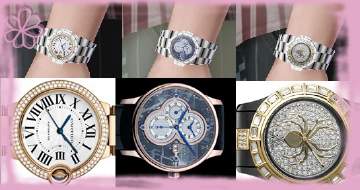
There are three sets of...three, that go as followed:
Set 1
- Emporio Armani - White Gold
- Baby Phat - Golden Studded
- Coach - Silver
Set 2
- D&G - Tropical Bird
- D&G - Black and White
- D&G - Gold Studded
Set 3
- Dior - Purple Studded (pictured)
- Dior - Diamond Bezzled
- Gucci - Silver
These are nothing but stencil overlays, so the watch band is fully recolorable.
And, unfortunately these are only for adult/YA females...apparently Maxis thinks that teens and elders are unworthy to wear watches.
If y'all like these, I might make some more


Additional Credits:
Photoshop
Delphy's CAS Texture Unitool
|
deswatches.rar
Download
Uploaded: 9th Jul 2009, 1.49 MB.
25,654 downloads.
|
||||||||
| For a detailed look at individual files, see the Information tab. | ||||||||
Install Instructions
1. Click the download button, or the filename, to download the file to your computer.
2. Extract the zip, rar, or 7z file. Now you will have either a .package or a .sims3pack file.
For Package files:
1. Cut and paste the file into your Documents\Electronic Arts\The Sims 3\Mods\Packages folder. If you do not already have this folder, you should read the full guide to Package files first: Sims 3:Installing Package Fileswiki, so you can make sure your game is fully patched and you have the correct Resource.cfg file.
2. Run the game, and find your content where the creator said it would be (build mode, buy mode, Create-a-Sim, etc.).
For Sims3Pack files:
1. Cut and paste it into your Documents\Electronic Arts\The Sims 3\Downloads folder. If you do not have this folder yet, it is recommended that you open the game and then close it again so that this folder will be automatically created. Then you can place the .sims3pack into your Downloads folder.
2. Load the game's Launcher, and click on the Downloads tab. Find the item in the list and tick the box beside it. Then press the Install button below the list.
3. Wait for the installer to load, and it will install the content to the game. You will get a message letting you know when it's done.
4. Run the game, and find your content where the creator said it would be (build mode, buy mode, Create-a-Sim, etc.).
Extracting from RAR, ZIP, or 7z: You will need a special program for this. For Windows, we recommend 7-Zip and for Mac OSX, we recommend Keka. Both are free and safe to use.
Need more help?
If you need more info, see:
- For package files: Sims 3:Installing Package Fileswiki
- For Sims3pack files: Game Help:Installing TS3 Packswiki
Loading comments, please wait...


Uploaded: 9th Jul 2009 at 7:35 AM
-
by Shep 29th Jun 2009 at 6:41pm
 44
134.1k
185
44
134.1k
185
-
-
-
-
-
-
by lurania 4th Jan 2010 at 5:48pm
15
66.3k
113
-
by joninmobile 9th May 2010 at 4:53am
3
43.8k
70
-
by -Mallow- 20th Feb 2012 at 10:55pm
34
79k
233
-
by SIMplified 18th May 2013 at 6:20am
9
23.1k
64

-

-
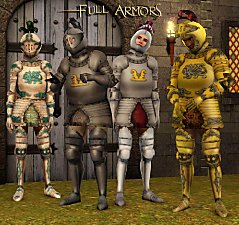
Medieval Male Armor CAS for Young Adults & Adults - Ye Olde Kingdom of Pudding
by The Merrye Makers 2nd Oct 2012 at 7:44am
Are you looking for armor for their knights? more...
+1 packs
29 77.1k 138 World Adventures
-

-
-

by daluved1 15th Jan 2011 at 12:14pm
The House Dress The husband has left for work and the kids have gone off to more...
14
74.3k
134
Female » Mixed Sets » Adult
-
-
Medieval Lighting - Ye Olde Kingdom of Pudding
by The Merrye Makers 11th Dec 2011 at 2:49pm
A collection of medieval lanterns made by Hekate999 for The Merrye Makers. Includes floor, wall, and table lanterns. more...
8
45.2k
135
-
Medieval Armoury Part 2 - Ye Olde Kingdom of Pudding
by The Merrye Makers 16th Dec 2011 at 10:17am
A selection of decorative weapons in the medieval style more...
15
54.5k
144
-
-


About Me
Because my policy is really inconsistent on my uploads, I've decided to make an official policy! So whatever you see here on my profile is my current policy. You may disregard any ''policy'' information you see on the actual upload itself.
-You may use my creations with sims
-You may use my objects with lots.
-You may retexture my meshes.
-You may include my meshes with retextures.
-You may NOT upload my creations with sims
-You may NOT upload my objects with lots.
-You may NOT upload my creations to paysites.
-You may NOT upload my creations to the exchange.
-Always credit me with a link
-I do NOT take requests!