
 Sign in to Mod The Sims
 Normal looking NL Vampire
 Normal looking NL Vampire
MTS has all free content, all the time. Donate to help keep it running.
SCREENSHOTS
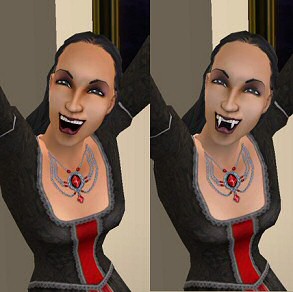

simvampire1.jpg - width=293 height=292
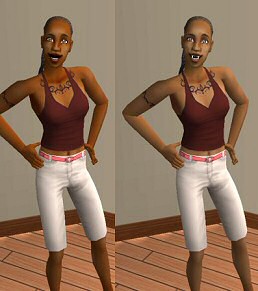
simvampire2.jpg - width=258 height=291
VampirePaleRedEye.jpg - width=430 height=415
Picked Upload!
This is a picked upload! It showcases some of the best talent and creativity available on MTS and in the community.
Created by .::TSN::.
Uploaded: 25th Sep 2005 at 2:05 AM
Updated: 21st Oct 2005 at 6:20 PM
Updated: 21st Oct 2005 at 6:20 PM
I got bored of blue vampires and decided to make vampire that looks like regular person. I replaced blue overlay skin with light grey one so that vampire Sim will be little bit paler than normal one but all makeup will now of course look better when not covered with blue color..
Also removed red eyes, normal eye color will remain now even if sim becomes vampire.
I might be able to make some different vampireskins too if requested, meaning simple stuff like red eyes included, default blue skin without red eyes, etc.
VampirePale(No)RedEye.zip
I made more paler skin with and without default red eyes. Below you can see comparison picture..
VampireDefaultNoRedEye.zip
Default blue shaded vampire skin without red eyes.
VampireInvisibleSkn.zip
This is completely invisible skin, no red eyes no shading in skin.. Your vampire will keep original skin completely.
Let me know if there are any problems...
Edit:
And I also give everyone permission to use these files as base for anything you can think of.. No need to credit me as long as things you make stay free.
Also removed red eyes, normal eye color will remain now even if sim becomes vampire.
I might be able to make some different vampireskins too if requested, meaning simple stuff like red eyes included, default blue skin without red eyes, etc.
VampirePale(No)RedEye.zip
I made more paler skin with and without default red eyes. Below you can see comparison picture..
VampireDefaultNoRedEye.zip
Default blue shaded vampire skin without red eyes.
VampireInvisibleSkn.zip
This is completely invisible skin, no red eyes no shading in skin.. Your vampire will keep original skin completely.
Let me know if there are any problems...
Edit:
And I also give everyone permission to use these files as base for anything you can think of.. No need to credit me as long as things you make stay free.
This is a Maxis Recolour which means that it is a recolour of an item that already exists in your game. Please check the Pack requirements to see which game pack it recolours.
| Filename | Size | Downloads | Date | |||||
|
VampireInvisibleSkn.zip
Size: 224.8 KB · Downloads: 26,507 · 4th Oct 2005 |
224.8 KB | 26,507 | 4th Oct 2005 | |||||
|
VampireDefaultNoRedEye.zip
Size: 303.6 KB · Downloads: 7,791 · 25th Sep 2005 |
303.6 KB | 7,791 | 25th Sep 2005 | |||||
|
vampirePaleNoRedEye.zip
Size: 225.4 KB · Downloads: 12,925 · 25th Sep 2005 |
225.4 KB | 12,925 | 25th Sep 2005 | |||||
|
vampirePaleRedEye.zip
Size: 250.2 KB · Downloads: 9,810 · 25th Sep 2005 |
250.2 KB | 9,810 | 25th Sep 2005 | |||||
|
vampireNoBlueNoRedEye.zip
Size: 267.2 KB · Downloads: 13,505 · 25th Sep 2005 |
267.2 KB | 13,505 | 25th Sep 2005 | |||||
| For a detailed look at individual files, see the Information tab. | ||||||||
Key:
- - File was updated after upload was posted
Install Instructions
Basic Download and Install Instructions:
1. Download: Click the download link to save the .rar or .zip file(s) to your computer.
2. Extract the zip, rar, or 7z file.
3. Place in Downloads Folder: Cut and paste the .package file(s) into your Downloads folder:
1. Download: Click the download link to save the .rar or .zip file(s) to your computer.
2. Extract the zip, rar, or 7z file.
3. Place in Downloads Folder: Cut and paste the .package file(s) into your Downloads folder:
- Origin (Ultimate Collection): Users\(Current User Account)\Documents\EA Games\The Sims™ 2 Ultimate Collection\Downloads\
- Non-Origin, Windows Vista/7/8/10: Users\(Current User Account)\Documents\EA Games\The Sims 2\Downloads\
- Non-Origin, Windows XP: Documents and Settings\(Current User Account)\My Documents\EA Games\The Sims 2\Downloads\
- Mac: Users\(Current User Account)\Documents\EA Games\The Sims 2\Downloads
- Mac x64: /Library/Containers/com.aspyr.sims2.appstore/Data/Library/Application Support/Aspyr/The Sims 2/Downloads
- For a full, complete guide to downloading complete with pictures and more information, see: Game Help: Downloading for Fracking Idiots.
- Custom content not showing up in the game? See: Game Help: Getting Custom Content to Show Up.
- If you don't have a Downloads folder, just make one. See instructions at: Game Help: No Downloads Folder.
Also Thanked - Users who thanked this download also thanked:
Packs Needed
Packs Needed
| Base Game | |
|---|---|
 | Sims 2 |
| Expansion Pack | |
|---|---|
 | Nightlife |
More Downloads BETA
Here are some more of my downloads: