| Search this Thread |
|
|
|
| starbux |
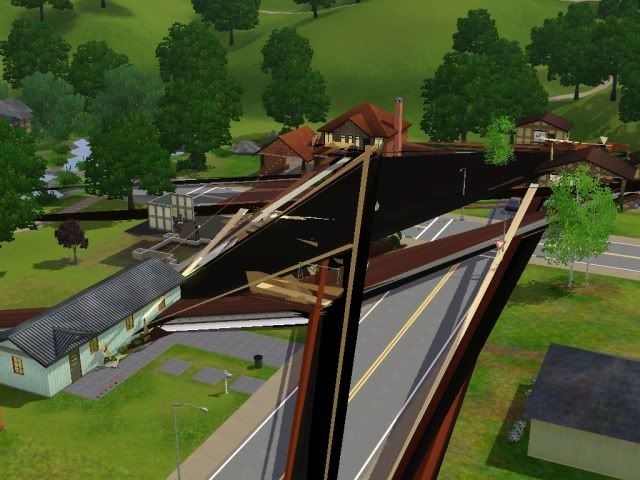
![]() As of yesterday this is what my game looks like on any lot selected. When you are viewing whole town in edit town mode you don't see this. I've tried build/buy mode from edit town and live mode also, it's the same. I haven't installed any new CC- game was perfect prior. I have uninstalled/reinstalled game without expansions, no cc and I still get this. All of my other games look fine so not sure if it's a graphic card issue or not. But as precaution I did make sure drivers are up to date. Any suggestions are appreciated. |
|
|
|
|
|
|
|
callistra
|
|
|
|
|
|
|
#3 |
| starbux |
------------------ System Information ------------------ Time of this report: 10/15/2010, 18:57:25 Machine name: YOUR-4DACD0EA75 Operating System: Windows XP Professional (5.1, Build 2600) Service Pack 3 (2600.xpsp_sp3_gdr.100427-1636) System Manufacturer: HP Pavilion 061 System Model: EL412AA-ABA M7367C Processor: Intel(R) Pentium(R) D CPU 3.00GHz (2 CPUs) Memory: 3070MB RAM Page File: 590MB used, 4364MB available DirectX Version: DirectX 10.0 (4.10.0000.5512) DxDiag Version: 5.03.2600.5512 32bit Unicode --------------- Display Devices --------------- Card name: ATI Radeon HD 4650 Manufacturer: ATI Technologies Inc. Chip type: ATI Radeon Graphics Processor (0x9498) Display Memory: 1024.0 MB Driver Name: ati2dvag.dll Driver Version: 6.14.0010.6999 (English) Driver Date/Size: 8/13/2009 21:27:20, 345600 bytes ------------- Sound Devices ------------- Description: Realtek HD Audio rear output Driver Name: RtkHDAud.sys Driver Version: 5.10.0000.5789 (English) Date and Size: 2/11/2009 12:40:40, 5028352 bytes ==Disk & DVD/CD-ROM Drives== Drive: C: Free Space: 207.0 GB Total Space: 277.4 GB File System: NTFS Model: Maxtor 6L300S0 |
|
|
|
|
|
#4 |
| starbux |
Well after messing around I decided to just reset settings back to default on graphics card from ccc and everything is fine now. just weird how it happened out of the blue |
|
|
|
|
|
#5 |
|
werismyki
Moderator
|
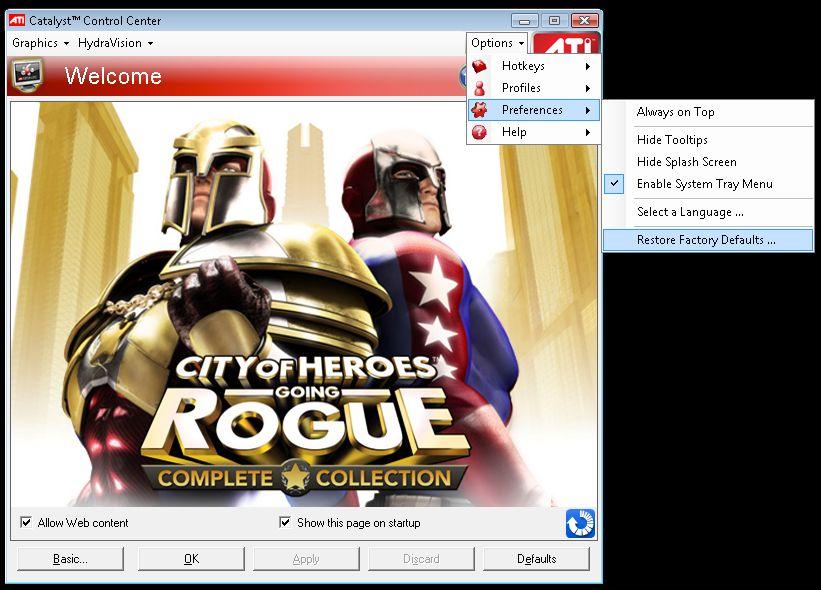
Try opening up ATI Catalyst Control Center, and clicking "Return to Factory Default", several other users have already posted similar issues and solved it. See the attached image below: ![]() EDIT: since I see you already found the answer, I'm gonna close the thread. |
|
|
|
|
|
#6 |
|
callistra
|
Well I'm not sure where you got your graphics drivers but they are really out of date. Also, that gpu is much newer than the rest of the computer. Did you remember to uninstall (not just pull out) the old graphics card from add/remove programs first? Did you upgrade the power supply too? The stock one is not strong enough. |
|
|
|
|
|
#7 |
| starbux |
Thx for the help, I did restore factory defaults and that seemed to resolve issue as game still runs fine (I do have older pc I upgraded the card and added more memory until full pc upgrade & power supply is next) |
|
|
|

Feeling like a bit of a chat about creation or just... whatever (not necessarily sims)?


Twitter
del.icio.us
StumbleUpon
Google